A money book that stays yours.
Qorion Expenses is an offline expense tracker for iPhone, Apple Watch and Android. No account, no cloud, no ads, nothing to buy. On Android it does not even ask for internet permission.


Free on Google Play and the App Store. iPhone, Apple Watch and Android, with nothing to unlock on any of them. Follow @qorion_sg to hear about the next app.
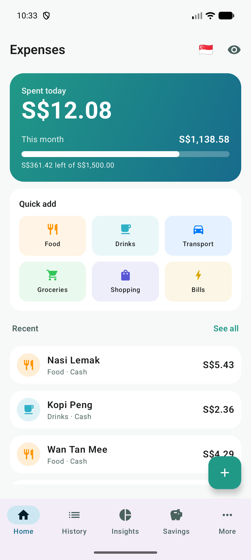
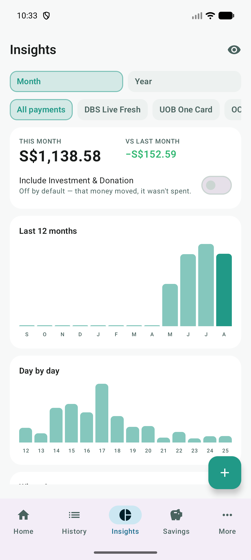
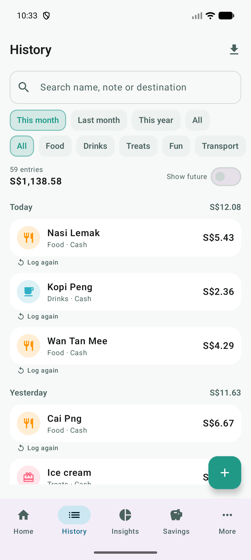
What it looks like
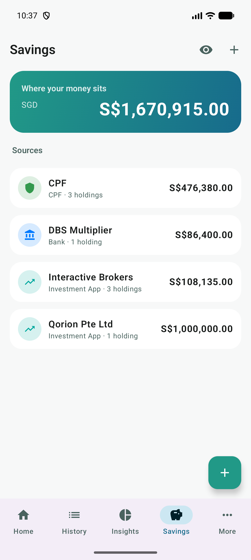
Screens from the Android build. The figures are sample data.
What it does
Built for the way money actually moves.
Why it has no account
A spending book is a record of where you were, what you eat, when you were paid and what you owe. That belongs on your phone, not on somebody's server.
So there is no sign-up, no password to lose and no sync service to trust. The Android app declares no internet permission at all, which means the data physically cannot leave the phone. Anyone can check that themselves in the app's permission list before installing.
The trade is real and worth saying out loud: if you lose the phone and have no backup file, the book is gone. That is why the backup is one file you control, and why it restores on either platform.
In plain terms
- No account, no password, no email needed
- No analytics, no advertising, no tracking
- No servers, so nothing to breach
- Receipt photos stay on the device
- Statements are read on the phone, never uploaded
- Free with nothing to unlock later
Built by Qorion, and the first of a few
We build custom software for businesses in Singapore. Qorion Expenses is the first app we have released under our own name, and it is free.
When we build something internally that turns out to be useful beyond our own desk, we would rather publish it than leave it sitting in a repository. More apps will follow the same way: small, focused, and free where there is no good reason to charge.
If you would like to hear when the next one lands, follow @qorion_sg.
Questions about the app go to support@qorion.sg, or find us on Instagram.